The nominal ledger sits at the heart of Sage 50, recording every financial transaction, categorising activities, and forms the foundation of accounting reports. The challenge with ledgers is always extracting meaningful data that businesses can actually use. Reports can often be detailed, but time-consuming to interpret and spotting anomalies often requires manual intervention.
Sage Copilot for Sage 50 changes this. It transforms nominal ledger data into clear, actionable insights that help business owners, accountants and finance teams make smarter business decisions. In this blog, we are going to explore how Sage Copilot enhances nominal reporting and aids with financial clarity for businesses.
What are Nominal Insights?
Nominal insights are essentially the analysis of your nominal ledger – the core financial records that track income, expenses, assets, liabilities and equity. Until recently, reviewing nominal data meant creating and trawling through multiple reports. However, Sage Copilot now automates this process by interpreting your nominal ledger, providing the following:
- Trend analysis
- Variance explanations
- Category-level profitability insights
- Balance sheet interpretation
- P&L summaries in jargon-free language
How Sage Copilot for Sage 50 Enhances Nominal Ledger Analysis
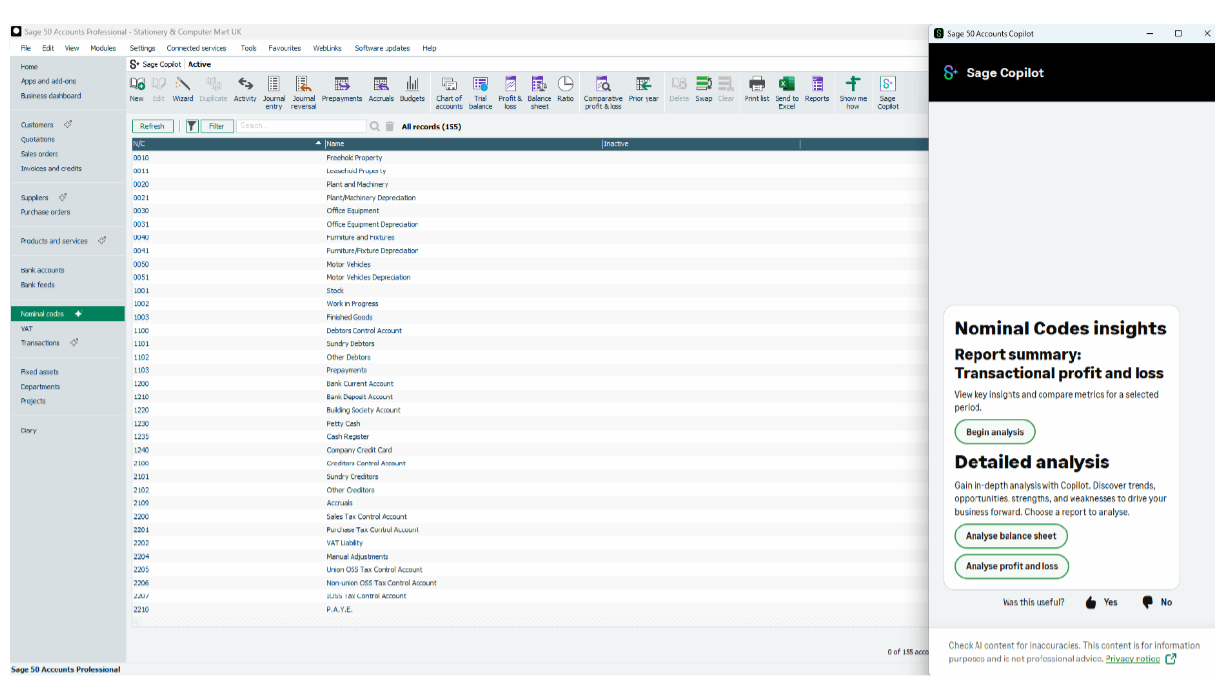
Sage Copilot works directly within Sage 50 to help analyse nominal codes and present insights in an easy-to-read way. You can ask detailed questions, such as:
- “Why have my overheads increased this month?”
- “Explain the variance in my cost of sales”
- “Summarise my P&L for the previous month”
This can help businesses save significant time, as not only does Sage Copilot do all the tricky calculations, it explains the ‘workings out’ if you like. Helping businesses make more informed financial decisions.
Key Nominal Insight Areas
1. Profit & Loss Interpretation – Sage Copilot can summarise a business’s P&L, highlighting the following:
- Revenue Trends
- Cost of sales movements
- Gross profit changes
- Overhead fluctuations
- Net profit performance
2. Balance Sheet Insights – Sage Copilot can help to explain asset movements, liability changes, working capital trends, cashflow pressures and more.
3. Variance Analysis – not only can Sage Copilot identify the following, it can also explain why the changes occurred in the first place:
- Unexpected increase in expenses
- Declines in revenue categories
- Seasonal fluctuations
- Supplier-driven cost changes
- Operational cost spikes
4. Anomaly Detection – Sage Copilot is able to easily flag any unusual transactions, duplicate entries, incorrect nominal postings, and unexpected spikes in specific codes. This helps reduce human error, and also improves accuracy of the financial data.
Nominal Insight Types & Their Benefits
| Insight Type | What Sage Copilot Does | Benefit to UK Businesses |
| P&L Interpretation | Summarises revenue, costs, and profit | Faster understanding of financial performance |
| Balance Sheet Insights | Explains assets, liabilities, equity | Clearer long‑term financial visibility |
| Variance Analysis | Highlights changes and trends | Better cost control and budgeting |
| Anomaly Detection | Flags unusual transactions | Reduced errors and improved accuracy |
| Cost Movement Tracking | Shows increases in expenses | Supports proactive cost management |
| Revenue Trend Analysis | Identifies growth or decline | Helps with forecasting and planning |
Understanding Nominal Trends with Sage Copilot
One of Sage Copilot’s most powerful features is trend analysis. Rather than manually comparing periods, Sage Copilot is able to automatically identify trends such as: rising costs, declining revenue streams, seasonal patterns, supplier-driven cost changes, and operational inefficiencies.
For example, if overheads increased by say 20% in a month, Sage Copilot could pinpoint the nominal codes responsible for this e.g. utilities, or travel. This means that businesses have a much clearer picture of their finances, and can make faster decisions to help increase profitability.
Here are a few nominal trend insights that Sage Copilot could identify and explain:
| Nominal Code | Trend Identified | Sage Copilot Explanation | Suggested Action |
| 7301 – Utilities | +18% increase | Supplier price rise detected | Review supplier contract |
| 4000 – Sales | -7% decline | Seasonal drop in demand | Adjust forecasting |
| 7500 – Marketing | +22% increase | Higher spend on digital ads | Evaluate campaign ROI |
| 5000 – Cost of Sales | +10% increase | Supplier cost increase | Review pricing strategy |
Why Nominal Insight Matter
Nominal reporting is one of those things that is often left to the bottom of the pile with many businesses. Business owners tend to look at the headline figures such as turnover, gross profit, and even cash in the bank account. Sage Copilot helps change this by:
- Making nominal data accessible
- Highlighting risks early
- Supporting better budgeting
- Improving cashflow planning
- Reducing reliance on manual analysis
- Helping non-financial teams understand financial performance
How Reality Can Help
While Sage Copilot for Sage 50 is a powerful tool, like with any AI-driven technology, it can only be as good as the person using it. As a long-standing Sage partner, we support Sage 50 customers across the UK to help them unlock the full potential of Sage Copilot. Our team ensures your system is configured correctly, and your staff understand how to use Sage Copilot to improve decision-making, reporting accuracy and financial visibility.
For a one-off fee of £900, we can handle everything for you – installation, configuration, testing, and personalised training. It is a small investment that delivers long-term value through more proactive financial management. If you are a Sage 50 customer looking to take advantage of AI-powered insights, get in touch with us and we’ll get you up & running quickly.
*This article contains general information in order to assist all of our customers and is meant for guidance only – there are no guarantees that the information we provide will be suitable for your particular needs. If you require specific assistance, we recommend that you seek professional guidance on your individual circumstances. Reality Solutions are in no way responsible for any loss or damage arising from any information contained within our articles.