Supplier invoices, credit notes and receipts can all add a surprising amount of administration to businesses of all sizes. Each invoice needs to be opened, checked and entered accurately before approval & payment happens. Different formats, multiple lines and varying tax rates can make the whole process even more time-consuming!
This is where Sage AI Document Capture comes in, as it reduces the manual work. It helps by reading supplier invoices, credit notes and receipts before extracting the relevant information and creating draft transactions. Finance teams are able to then process documents more quickly, but still remain in control of the final figures.
What is Sage AI Document Capture?
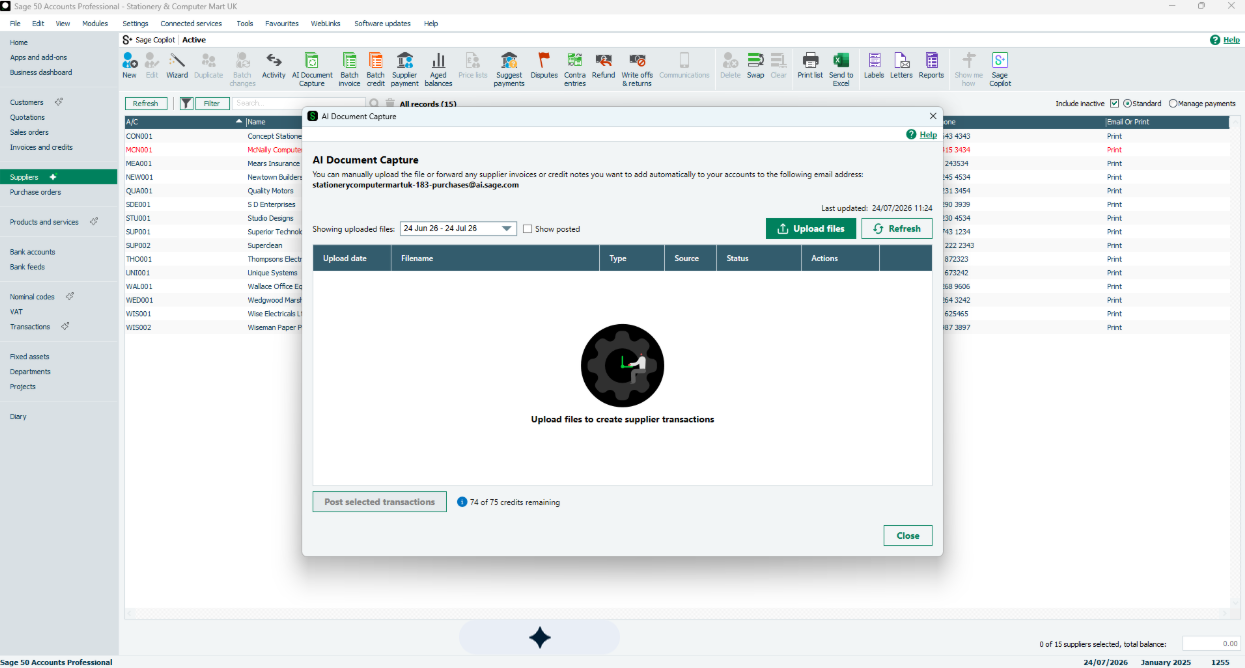
Sage AI Document Capture is an intelligent document-processing feature available in Sage 50, version 31 and above. Users are able to upload or email supplier documents, which Sage then scans for the data needed to prepare the transaction.
Machine learning is used to identify the supplier, and match the document to its record. The system is able to differentiate between different formats for names, dates and addresses as well as multi-line items.
From the captured information, Sage is able to create a draft supplier invoice which the user can review and amend before approving it. This means that while the majority of the process is automated, humans are still needed for the final seal of approval.
| Supplier document task | How Sage AI Document Capture helps |
| Receiving documents | Accepts uploaded or emailed supplier files |
| Reading information | Extracts relevant data from the document |
| Identifying the supplier | Matches the document with a supplier record |
| Handling detailed invoices | Reads multi-line items and different tax rates |
| Creating the transaction | Produces a draft invoice ready for review |
| Checking for repeat entries | Flags suspected duplicate documents |
| Final approval | Allows the user to review and amend details first |
How Does Sage AI Document Capture Work?
The software is able to scan an uploaded document, and then uses machine learning to identify and classify the information. Sage can then match the supplier and creates a draft transaction for the user to check, correct and approve.
| Stage | What happens |
| 1. Submit | A supplier invoice, credit note or receipt is uploaded or emailed |
| 2. Capture | Sage scans the document and extracts the relevant data |
| 3. Match | The system identifies and matches the supplier |
| 4. Create | A draft transaction is prepared in Sage 50 Accounts |
| 5. Review | The user checks the data and any suspected duplicate warning |
| 6. Approve | The completed transaction is approved for processing |
One of the main advantages of Sage AI Document Capture is that it continuously learns from each user, so it becomes better informed as time goes on.
What Are The Benefits of AI Document Capture?
AI Document Capture can halve supplier invoicing time – instead of typing information from every single document, users are able to focus on reviewing data that has already been extracted. This can help businesses in lots of different ways:
- Saves time: routine data extraction is automated, reducing repetitive administration
- Improves consistency: every supplier document undergoes the same capture & review process
- Reduces entry errors: less retyping means fewer opportunities to enter incorrect information
- Duplicates easily spotted: suspected duplicate documents are flagged automatically for the user to review
- Retain control: draft versions are created so they can be checked & corrected before final approval
- Avoids having a separate add-on: AI Document Capture is built into Sage 50 accounts, so there is no separate app to install and pay for
Is Sage AI Document Capture Right For Your Business?
The feature is perfect for businesses that regularly receive supplier invoices and spend lots of time entering them manually. It is also really useful for invoices that have varied layouts, tax rates and line-item formats.
It is worth remembering that software can make mistakes, so users still need to be responsible for checking its accuracy before approval.
Reality Solutions can help you choose the right Sage 50 accounts package, as well as setting up AI Document Capture to work for your business. Contact us today to discuss how AI-powered document capture could help reduce the time your business spends on processing supplier paperwork.
Frequently Asked Questions
1. What is Sage AI Document Capture?
It is a Sage 50 accounts feature that extracts information from supplier invoices, credit notes and receipts, then creates draft transactions for users to review and approve.
2. Which version of Sage 50 includes AI Document Capture?
AI Document Capture is available in Sage 50 Accounts version 31 and above.
3. Does AI Document Capture approve invoices automatically?
No, it creates a draft transaction. The user remains in control and can review, correct or change the details before approval.
4. Can Sage AI Document Capture identify duplicate invoices?
Sage flags suspected duplicates so that the user can review them before completing the transaction.
*This article contains general information in order to assist all of our customers and is meant for guidance only – there are no guarantees that the information we provide will be suitable for your particular needs. If you require specific assistance, we recommend that you seek professional guidance on your individual circumstances. Reality Solutions are in no way responsible for any loss or damage arising from any information contained within our articles.